

Every Kenyan with a KRA PIN is legally required to file an annual income tax return, even if they earned nothing during the year. This is not optional, and it does not matter whether your employer already deducts PAYE from your salary every month. Filing is mandatory for all registered taxpayers, and missing the deadline attracts penalties that accumulate month after month.
The good news is that filing has never been simpler. Through KRA’s iTax portal, most Kenyans can now complete their return in under 30 minutes; and for nil returns or salaried employees with pre-populated data, it can take as little as five minutes. This guide covers who must file, the key deadlines, step-by-step instructions for nil returns and employed filers, what self-employed Kenyans need to know, common mistakes to avoid, and what happens if you miss the deadline.
Who Is Required to File KRA Returns in Kenya?
Every individual and entity with a KRA PIN in Kenya is required to file annual income tax returns, regardless of whether they earned any income during the tax year. This includes employed persons, self-employed individuals, business owners, landlords, and even students or unemployed persons who have registered for a KRA PIN.
Here is the full breakdown:
- Employed individuals (PAYE earners): Even if your employer deducts tax every month and remits it to KRA on your behalf, you are still personally required to file an annual return. This is one of the most widespread misconceptions in Kenya: “My company pays my taxes, so I don’t need to file.” It is wrong. Filing is how KRA reconciles employer remittances with your personal declaration, and it is the only way to claim tax refunds or additional reliefs you may be owed.
- Self-employed people, freelancers, and consultants: If you earn income outside formal employment (from consulting, casual work, online jobs, or a business), you must declare that income and calculate the tax owed.
- Landlords and property owners: Rental income is taxable in Kenya. Whether you rent out a bedsitter in Zimmerman or multiple units in Kilimani, you are required to declare this income annually.
- Business owners and directors: Anyone running a registered business or holding a directorship must file, even if the business made no profit or is currently dormant.
- Individuals with no income: You still file a nil return. No income does not mean no obligation.
The bottom line: if you have a KRA PIN, you file. No exceptions.
Key KRA Filing Dates and Deadlines
Getting the dates right matters; penalties start accumulating the day after a missed deadline.
For the 2026 filing season, taxpayers are required to file income tax returns for the year of income covering January 1 to December 31, 2025. The filing window is open from January 1, 2026, to June 30, 2026, with the individual deadline being June 30, 2026.
Here are all the key dates for 2026:
| Obligation | Deadline | Who It Applies To |
| Annual income tax return (2025 year of income) | 30 June 2026 | All KRA PIN holders |
| Monthly PAYE and withholding tax | 9th of following month | Employers and agents |
| VAT returns | 20th of following month | VAT-registered businesses |
| Installment tax (4th/final installment) | 20 December | Self-employed individuals |
| P9 form issuance by employers | 31 January | Employers must provide to employees |
The late filing penalty for individuals stands at KSh 2,000 or 5% of the tax due, whichever is higher, with late payment interest accruing at 1% per month on any unpaid balance.
One practical warning: do not wait until the last week of June; the iTax platform slows down significantly as the deadline approaches. File early, especially if you have a complex return with multiple income sources.
Types of KRA Returns You Might Need to File
Not all returns are the same. Knowing which one applies to you saves time and prevents errors.
- Nil return: For individuals who had no income during the year. The most commonly filed return type, especially by students, recent graduates, and those who were unemployed during the year. Fast and simple to complete.
- Employment income return (using P9 form): For salaried employees whose only income is from formal employment. This is now streamlined in 2026; many employees will find their data pre-populated when they log in.
- Resident individual return (IT1 – full return): For individuals with income from multiple sources, such as salary plus rental income, a side business, freelance income, dividends, or capital gains. Requires the Excel/ODS form rather than the simplified web-based return.
- Monthly Rental Income (MRI) return: For landlords earning residential rental income. Taxed at 10% of gross rent for properties generating more than KSh 24,000 per month. Declared and paid monthly; not just at year end.
- Turnover Tax (TOT): For small businesses with annual turnover between KSh 1 million and KSh 25 million. Charged at 1.5% of gross turnover. Simpler to file than the full business income return, with no requirement to submit a full profit and loss statement.
- VAT return: For businesses registered for VAT (annual turnover above KSh 5 million). Filed monthly by the 20th of the following month.
How to File Nil Returns on KRA iTax (Step-by-Step)
Nil returns are the simplest type of return and take approximately five minutes to complete. KRA is transitioning toward an automated nil return system for low-income earners and those with no registered income, accessible via the M-Service App or by dialling *572#. However, you can also file directly on iTax as follows:
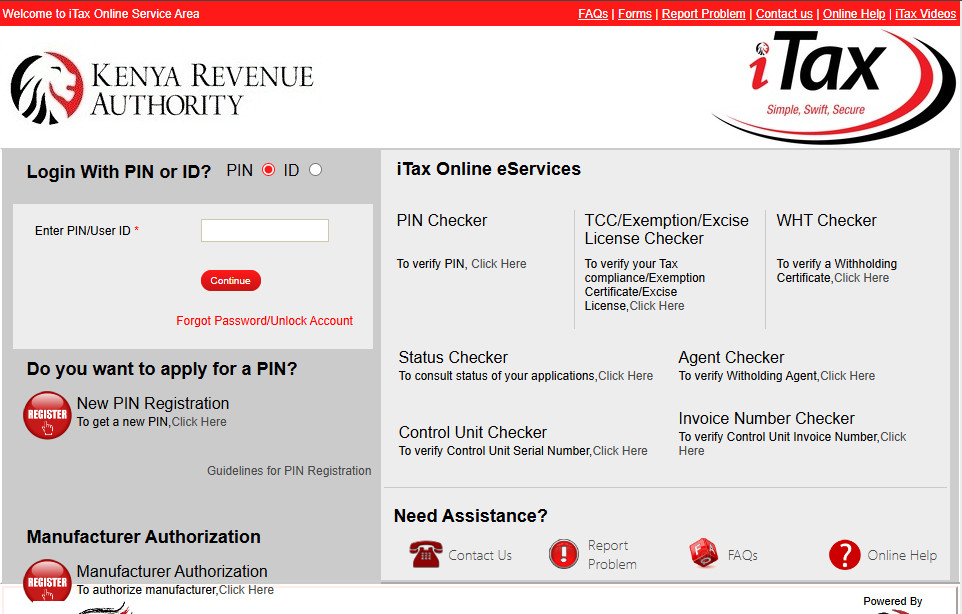
Step 1: Go to itax.kra.go.ke and log in using your KRA PIN and password. You can also log in using your National ID number if you have forgotten your PIN.
Step 2: On the navigation menu, click Returns → File Returns.
Step 3: Select the return type: Income Tax – Resident Individual.
Step 4: Confirm the return period; enter 01/01/2025 as the start date. The system will auto-populate the end date as 31/12/2025.
Step 5: When prompted about income sources, select nil or leave all income fields at zero. Do not enter any figures in income sections.
Step 6: Proceed through the form. The system will calculate zero tax due.
Step 7: Click Submit. The system will generate an Acknowledgement Receipt; download and save this immediately. It is your legal proof of filing.
That is it. A nil return is complete. Store the acknowledgement receipt on your phone or email; you may be asked to produce it when applying for jobs, loans, or government services.
How to File KRA Returns as an Employed Person (Using Your P9 Form)
For salaried employees, the 2026 filing process is now significantly more streamlined. From 2026, iTax automatically pulls your PAYE data from employer submissions. Many salaried employees can now see their details pre-populated simply by logging in. Here is the full process:
Before you start, get your P9 form. Your employer should provide you with a P9 form by April each year. The P9 shows your total earnings, PAYE deductions, and benefits. It is your employer’s legal obligation under the Income Tax Act to issue this. If your HR department has not sent it, request it directly. Also ensure your P9 correctly reflects your SHIF contributions and Affordable Housing Levy deductions, as these are now included in the 2026 return forms.
Step 1: Log in to itax.kra.go.ke.
Step 2: Go to Returns → File Returns → Select ITR for Employment Income Only (the simplified web-based return, suitable for employees with salary as their only income source).
Step 3: Confirm the return period (01/01/2025 to 31/12/2025).
Step 4: Navigate to Section F (Employment Income) and verify your employment income details. Cross-check the figures against your P9 form. Then go to Section M (PAYE Deducted) and verify the PAYE deducted matches your P9. If there is a discrepancy between what iTax has pre-populated and your P9 form, use the Excel IT1 form to manually correct the figures before submitting.
Step 5: Go to Section T (Tax Computation) and confirm the relevant deductions, including pension contributions, affordable housing levy, SHIF contributions, and personal relief entries.
Step 6: Claim any additional reliefs you are entitled to. Common ones include:
- Personal relief: KSh 28,800 per year (KSh 2,400/month) – applied automatically
- Insurance relief: 15% of premiums paid for life, health, or education insurance, up to KSh 5,000 per month
- Pension contribution relief: Contributions to a registered pension scheme up to KSh 240,000 per year
- Mortgage interest relief: Up to KSh 300,000 per year if you have a home loan
Many employees leave money on the table every year by failing to declare insurance premiums or pension contributions. If your employer did not apply these reliefs at payroll level, you can claim them when filing and may receive a tax refund.
Step 7: Submit the return and download your acknowledgement receipt immediately.
How to File KRA Returns as a Self-Employed Person or Business Owner
If you earn income outside formal employment (from a business, freelancing, consulting, rental properties, or the gig economy), your filing obligation is more involved but entirely manageable.
- Declare all income. KRA’s systems are increasingly automated. Bank reporting, M-Pesa monitoring, and eTIMS integration mean that undeclared income is more likely to be flagged than it was in previous years. Declare honestly.
- Keep basic records. You do not need a full audited set of accounts for most small businesses, but you do need to know your total revenue for the year, your total deductible expenses, and your net profit. Expenses must be backed by eTIMS-compliant invoices from 2026 onwards. If a supplier fails to capture your PIN on eTIMS, that expense will be automatically disallowed during the 2026 filing.
- Rental income: Residential rental income is taxed under the Monthly Rental Income (MRI) regime at 10% of gross rent for properties generating more than KSh 24,000 per month. This is paid monthly and must be reconciled in your annual return. Landlords earning below this threshold should still declare and may file under the standard individual return.
- Turnover Tax (TOT): If your business turnover is between KSh 1 million and KSh 25 million per year, you can opt into the TOT regime, paying 1.5% of gross turnover quarterly. This is simpler than calculating a profit and loss for the full individual return and is worth considering for traders, informal sector sellers, and small business owners.
- Installment tax: Self-employed individuals with an annual tax liability above KSh 40,000 are required to pay estimated tax in four installments during the year, not just at filing time. Instalments are due in April, June, September, and December. Failing to pay installments on time attracts penalties even if you file on time at the end of the year.

Common KRA Filing Mistakes to Avoid
Even well-intentioned filers make errors that cost them money or attract penalties. Here are the most frequent ones to watch out for:
- Filing late because “PAYE was already deducted.” This is the single most common reason Kenyans accumulate penalties. Your employer paying PAYE does not remove your personal filing obligation. File by June 30 regardless.
- Filing nil returns when you had income. If you earned any income during the year (from a side hustle, casual work, rental income, or a business), you cannot file a nil return. KRA treats this as under-declaration, which can lead to an audit or penalties far larger than the tax you would have owed.
- Incorrect P9 figures. Always cross-check the figures on your P9 form against your payslips before entering them. A transposition error (e.g., entering KSh 360,000 instead of KSh 306,000) creates a discrepancy that may flag your account for review.
- Forgetting to claim available relief. Insurance premiums, pension contributions, and mortgage interest can all reduce your tax liability or generate a refund. Many employees miss these because their employer did not apply them at the payroll level.
- Filing multiple times for the same period. If you made an error, do not file a new return; use the File Amended Return option on iTax. Duplicate submissions create confusion and complications.
- Ignoring an outstanding tax balance. If your return shows tax owed (even KSh 1), pay it by the deadline. Unpaid balances attract a 5% penalty plus 1% monthly interest that compounds quickly.
- Not downloading the acknowledgement receipt. This is your only proof that you filed. Always download and save it immediately after submission.
What Happens If You Don’t File KRA Returns?
The consequences of non-filing escalate over time and can affect far more than just your finances.
- Financial penalties accumulate immediately: KSh 2,000 per year for individuals as a minimum, rising to 5% of tax due if you have income. Late payment interest of 1% per month compounds on any unpaid balance. A few missed years can result in a penalty debt of KSh 10,000–20,000 or more before you realize it.
- Blocked government services: KRA can bar you from accessing government services via eCitizen, block business permit renewals, and refer your case to debt collectors. In practice this means you may be unable to renew your driver’s license, obtain a police clearance certificate, access Huduma Centre services, or qualify for government tenders.
- No Tax Compliance Certificate (TCC): Many employers, banks, and procurement bodies require a valid TCC as part of their application process. A TCC is only issued to taxpayers who are up to date with all filings and have no outstanding debt. The TCC is valid for 12 months and can be applied for instantly via iTax if you are fully compliant.
- Audit risk: KRA’s automated systems flag non-filers and can initiate an audit. Being audited is a time-consuming, stressful process; and the resulting tax assessment, once raised, carries its own penalty and interest obligations.
The important thing to know: filing late is always better than not filing at all. Even if you have missed several years, you can file back-dated returns on iTax for the past five years. The penalties will apply, but they stop accumulating once you file, and you can apply for a penalty waiver in cases of genuine hardship.
Frequently Asked Questions
What is the deadline for filing KRA returns in Kenya?
The deadline for filing your annual income tax return is June 30 each year. For the 2025 year of income, the deadline is June 30, 2026. Do not wait until the last day; the iTax system experiences heavy traffic near the deadline and can be slow or temporarily unavailable.
How do I file nil returns on KRA iTax?
Log into itax.kra.go.ke, go to Returns → File Returns, select Income Tax – Resident Individual, confirm the return period, leave all income fields at zero, and submit. You will receive an acknowledgement receipt immediately. The process takes about five minutes. You can also file nil returns via the KRA M-Service app or by dialing *572#.
What is a P9 form and where do I get it?
A P9 form is a tax deduction card issued by your employer that summarizes your gross income, PAYE deductions, and statutory contributions (NSSF, SHIF, Housing Levy) for the year. Your employer is legally required to issue it by January 31 for the previous tax year. If you have not received yours, request it from your HR or payroll department. It is the key document you need to file your employment income return accurately.
Can I file KRA returns on my phone?
Yes. You can file through the KRA M-Service app (available on Android and iOS) or via USSD by dialling *572#; useful for nil returns without needing a smartphone. The full iTax portal at itax.kra.go.ke is also mobile-browser accessible, though it works best on a desktop or tablet for more complex returns.
What happens if I file KRA returns late?
You will be charged a late filing penalty of KSh 2,000 for individuals or 5% of the tax owed, whichever is higher. If you also had unpaid tax, a further 1% monthly interest accrues on the unpaid balance. File as soon as possible to stop the penalty clock. In previous years, KRA has occasionally offered penalty waivers during system downtime or high-volume periods, but you cannot count on this, so it is best to file well before the deadline.
Stay on Top of Your Finances
Filing your KRA returns on time is the foundation of financial compliance in Kenya; it keeps your TCC valid, your eCitizen services accessible, and your record clean. If you are a business owner or side hustler trying to manage your income and expenses more effectively before the next filing season, our guide on how to save money in Kenya and the best budgeting apps in Kenya are good starting points. If you run a small business and are thinking about your tax structure, also see our guide on how to start a business in Kenya with KSh 10,000.
Coming soon to SokoMix: a PAYE and tax calculator tool that lets you quickly estimate your income tax before you sit down to file. In the meantime, browse the SokoMix classifieds for accountants, tax consultants, and financial service providers operating near you.